Channel Space
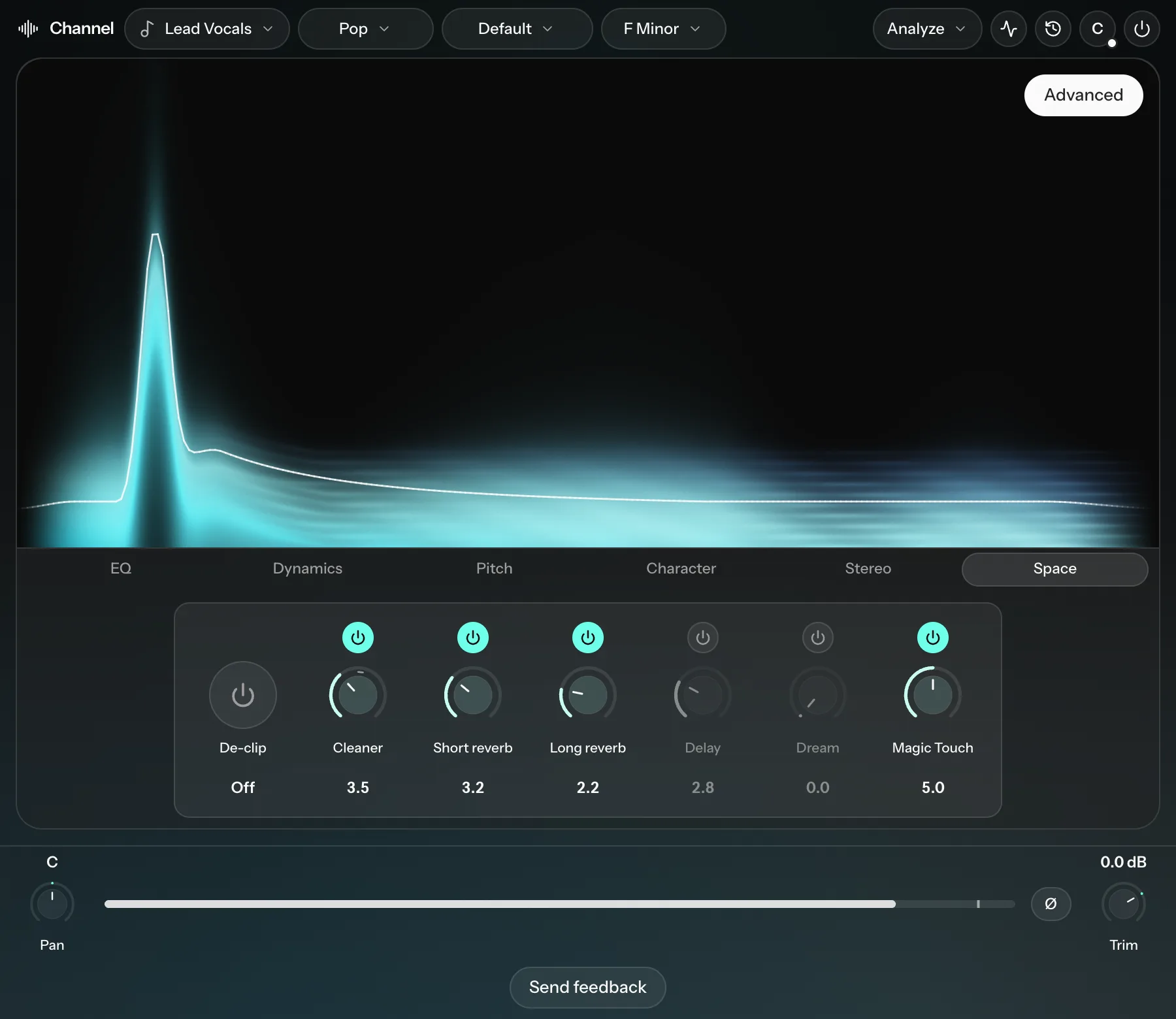
De-clip, Cleaner, Short reverb, Long reverb, Delay and Dream.
| Knob | What it does |
|---|---|
| De-clip | Repairs clipped audio (audio recorded too loud) with Cryo Mix's own model, in real time. It is either Off or On. |
| Cleaner | Removes background noise from vocals, such as hiss, hum, room tone, fans and bleed. |
| Short reverb | A short-tail reverb. Higher is more obvious. |
| Long reverb | A long-tail reverb, for big halls and cathedral sounds. |
| Delay | Echoes in time with the song. Higher is louder. |
| Dream | A granular effect that breaks the track into small grains and scatters them, for atmospheric sounds. |
| Magic Touch | Adds the throws, swells and tails a mix engineer would, in the gaps. See Magic Touch. |
De-clip and Cleaner
De-clip's settings show how much of the signal is being repaired: Repair and Maximum, over the last 5 seconds.
Cleaner is only available on vocals. It is tuned for speech-like vocals, so on long sung notes it can sometimes treat the voice as noise. If you hear the vocal being dulled, turn it down.
Short reverb and Long reverb
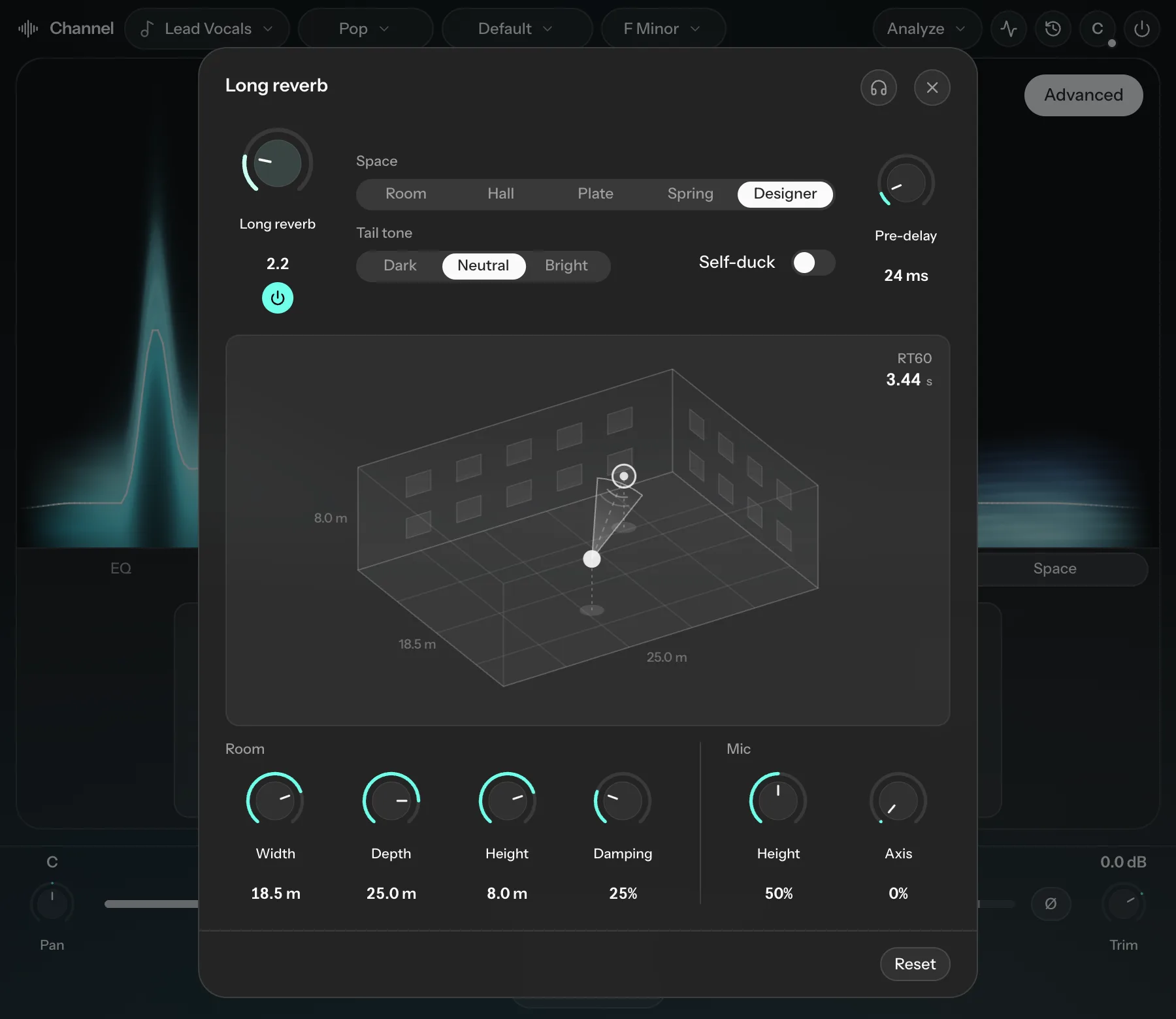
Both have the same settings:
- Space: Room, Hall, Plate, Spring or Designer.
- Tail tone: Dark, Neutral or Bright.
- Pre-delay (0 to 250 ms): delays the start of the reverb so the dry track is heard first. You keep the space but the reverb feels less in the way.
- Self-duck: pulls the tail down while the track plays and lets it bloom in the gaps. It does a similar job to pre-delay and is often more effective.
Designer gives you a simulated room. Drag the source and the microphone around the floor. Under Room, set Width, Depth, Height and Damping; as Damping rises, acoustic panels appear on the walls. Under Mic, set its Height and Axis (which way it points). The readout shows the room's reverb time (RT60).
Delay
- Type: Ping-pong bounces the echoes between left and right. Straight keeps each echo where the track is.
- Division: how fast it repeats, in time with the song: 1/2, 1/4, 1/8, 1/8T (triplet), 1/8D (dotted) or 1/16. The readout shows the time in milliseconds at your project tempo.
- Self-duck: keeps the echoes quiet while the track plays, so they fill the gaps after phrases.
Dream
Open Dream designer to shape it:
| Control | What it does |
|---|---|
| Self-duck | Turns Dream down while the track plays. |
| Size | The length of each grain (20 to 220 ms). |
| Density | How many grains play per second (8 to 96). |
| Pitch | How far each grain's pitch can wander at random (0 to 12 semitones). At 0 every grain keeps its pitch. |
| Scatter | How randomly grains are picked and timed, with occasional reversed grains. |
| Flight | How much grains move between left and right. |
| Persist | How long grains keep feeding back into the effect. |
| Horizon | The echo time (180 to 1400 ms). |
| Bloom | How much reverb is added after the grains. More sounds airier; less keeps it glitchy. |
Click the headphones at the top of the window to hear only the dream layer.
Careful with Persist: high values feed the effect back on itself and give very long tails. Keep it moderate unless that's the sound you're after.